

Deposit API Documentation
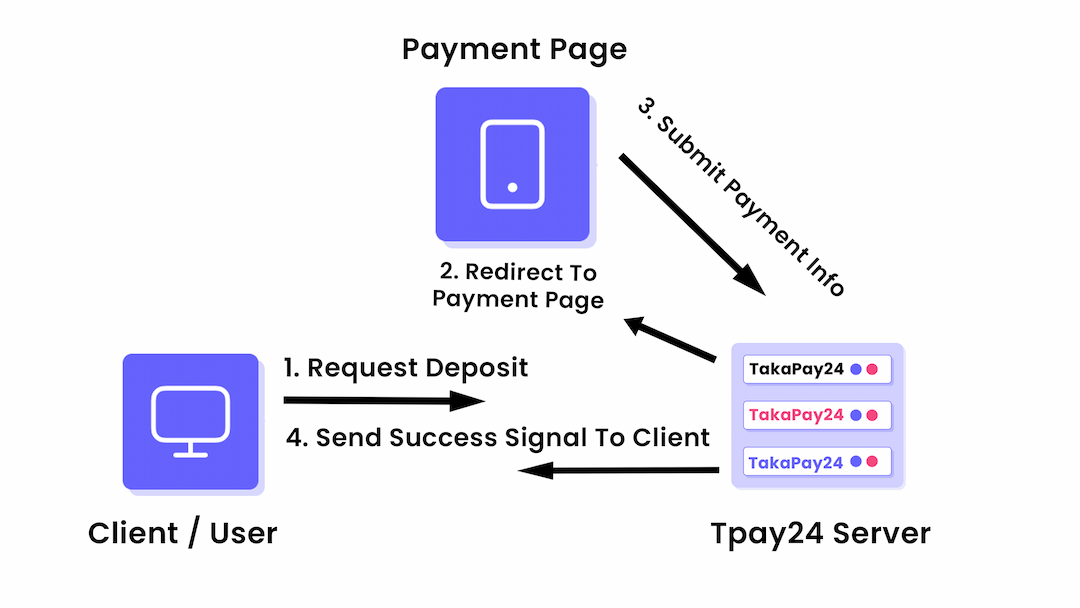
On this page, we'll dive into the different endpoints you can use to manage deposit process. We'll look at how to create Payment Link for deposit money.
Generate Payment Page URL
To Generate Payment Page URL. Follow the instructions below.
Required attributes
- Name
secret- Type
- string
- Description
API SECRET KEY
- Name
amount- Type
- string
- Description
The Deposit Amount. Example: 1000 or 1000.00 (Decimal Point Allowed)
- Name
reference_id- Type
- string
- Description
A Reference ID For The Transaction or account_id / username of the user who is submitting the payment info. Your user can directly contact TakaPay24 support using this Reference ID. If they want to know the deposit status.
- Name
wallet_name- Type
- string
- Description
BKASH | NAGAD | ROCKET | UPAY etc
- Name
payment_type- Type
- string
- Description
deposit | withdraw
JavaScript
await fetch(endPoint, {
  method: 'POST',
  headers: {
    'Content-Type': 'application/json',
    Accept: 'application/json',
  },
  body: {
    secret: 'YOUR API SECRET KEY',
    amount: '1000.00',
    reference_id: 'john_1234',
    wallet_name: 'bkash',
    payment_type: 'deposit',
  },
})
Returned Response
Once you get the response successfully. You can store the information on your own databse if you want for future reference. You will have a payment page url. A Unique validation_id From Our side. You must store this ID in your database. Because this is the only Unique ID by which you can always check the payment status whether the deposit has been successful or not.
Response
{
  status: true,
  message: "Payment Link Generated",
  payment_url: "https://pay.takapay.com/payment/4568930036",
  validation_id: "4568930036",
  wallet_name: "bkash",
  amount: "1000.00",
  payment_type: "deposit",
  reference_id: "john_1234"
}
How To Know Whether the payment is Success or Not?
Once TakaPay24 Server Receives Correct Payment Information From The User. It will verify the payment information. Once Verified! The Server will send a confirmation to your server by a POST REQUEST API CALL. That means. You will have to setup a API End Point to receive the message from us.
The API Must have the same Pathnames as like below. And the domain must be the same domain from where the payment request was made.
https://your_website.com/ api/v1/tpay24_listener
After getting the Signal From TakaPay24 Server. Client Server (You) will handle the request and update User's Wallet Balance .
Payment Status Explanation
Success: The payment has been successful & TakaPay24 Server has received the amount successfully.
Timeout: The User did not submit any payment information in time and the payment page has been expired.
Verifying: The User has submitted the payment information already and TakaPay24 Server is verifying the information. Takes 5 Seconds only!
Failed: The User has submitted the payment information and TakaPay24 Server did not find any match in last 24 hours.
Pending: The payment link has been generated already. TakaPay24 Server is waiting for payment information from the User.
TakaPay24 Will Make This Request
await fetch(endPoint, {
  method: 'POST',
  body: {
    status: true,
    message: 'Payment Verified',
    payment_status: 'success',
    validation_id: '4568930036',
    payment_type: 'deposit',
    wallet_name: 'bkash',
    amount: '1000.00',
    sender_number: '01234567890',
    receiver_number: '01234567890',
    trx_id: 'BKASH00000',
    reference_id: 'john_1234',
  },
})
Manually Check Payment Status
Required attributes
- Name
secret- Type
- string
- Description
API SECRET KEY
- Name
validation_id- Type
- string
- Description
The Validation ID which you received after generating the payment request.
- Name
reference_id- Type
- string
- Description
The Reference ID which you sent TakaPay24 When generating the payment page URL / LINK.
- Name
wallet_name- Type
- string
- Description
BKASH | NAGAD | ROCKET | UPAY etc
- Name
payment_type- Type
- string
- Description
deposit | withdraw
JavaScript
await fetch(endPoint, {
  method: 'POST',
  headers: {
    'Content-Type': 'application/json',
    Accept: 'application/json',
  },
  body: {
    secret: 'YOUR API SECRET KEY',
    validation_id: '4568930036',
    reference_id: 'john_1234',
    wallet_name: 'bkash',
    payment_type: 'deposit',
  },
})
Response
{
  "status": true,
  "message": "Payment Verified",
  "payment_status": "success",
  "validation_id": "4568930036",
  "payment_type": "deposit",
  "wallet_name": "bkash",
  "amount": "1000.00",
  "sender_number": "01234567890",
  "receiver_number": "01234567890",
  "trx_id": "BKASH00000",
  "reference_id": "john_1234"
}